Monthly management reports in Xero come from Xero's own reports: the Management Report pack, the Budget Variance report and the aged receivables and payables, run each month once the books for that month are closed. Before the first pack, set up the ledger so the reports can be relied on: a reconciled bank, a chart of accounts that keeps direct costs apart from overheads, tracking categories for departments or jobs, a budget, and a monthly close that posts accruals and prepayments.
What needs to be right in the ledger
Every report in the pack reads from the same ledger, so a fault in the ledger shows up in every report. Put these in place first.
- The bank reconciled to the statement balance on the last day of the month, for every bank account, credit card and payment provider.
- A chart of accounts with direct costs separated: materials, subcontractors, direct labour and freight coded to cost of sales accounts, with rent, office salaries and software in overheads. Without that split, the Profit and Loss cannot show a gross margin.
- Tracking categories for departments, sites or types of job, so each one can be reported against its own budget.
- Accruals and prepayments posted each month, so costs land in the month they belong to.
- A monthly close finished on a fixed timetable, with the period locked in Xero once it has been reviewed.
The month-end close for a small business sets out a five-day timetable step by step.
Tracking categories
Xero uses tracking categories in place of department codes or cost centres. Xero's help centre says an organisation can have up to four tracking categories, with two active at any one time, and each category holds a list of options. A contractor might set up a category called Division with options for New build, Refurbishment and Maintenance. A recruitment business might use Desk, with an option for each recruitment team.
To add one, go to the Accounting menu, select Accounting settings, then Tracking categories, and click Add Tracking Category (Xero's help centre). Name the category, enter each option and save. Each invoice, bill and bank transaction line can then carry an option, and the Profit and Loss and Budget Variance reports can be filtered by it. Transactions posted before the category existed have no option against them until someone edits them, so start at the beginning of a month.
The Xero reports in the pack
Xero's help centre describes the Management Report as a pack of six reports by default: Executive Summary, Cash Summary, Profit and Loss, Balance Sheet, Aged Receivables Summary and Aged Payables Summary. You can add more reports, including a second version of the same report, and remove or reorder them. You can also start an empty pack from the menu next to Management Report by selecting Create new report pack, then add only the reports you want.
A monthly pack for an owner-managed business would hold these reports.
- Budget Variance: actual income and costs for the month against the budget, with the variance as an amount and a percentage.
- Profit and Loss: the month against the same month last year, with gross profit shown above the overheads.
- Balance Sheet: this month against last month.
- Aged Receivables Summary and Aged Payables Summary: who owes you, who you owe and how long each amount has been outstanding.
- Cash Summary: the month's cash movements, including working capital.
Once the pack is set up, click Save as, then Custom, and give it a name. Next month, open the custom pack, change the Pack date range and click Update. The help centre notes that options such as the number of comparison periods are set report by report, and the date range is the only setting that applies to the whole pack.
Budget Manager and the Budget Variance report
Budgets are entered in Budget Manager, found under All reports in the Reporting menu. The Overall Budget is the default, and further budgets can be added for a tracking category (Xero's help centre). Enter the first month for each account, then use the green arrows to fill later months with a fixed amount, a monthly increase or a percentage increase.
The Budget Variance report compares actual figures with the budget. Xero calculates variance as the first column minus the second, and the percentage as that variance divided by the second column. Arrows show whether each variance is favourable or unfavourable. Use Edit layout to add variance columns, and Filter to show one tracking option against its own budget.
October sales and gross profit against budget
| Sales, budget | £250,000 |
| Sales, actual | £231,500 |
| Sales variance (actual minus budget) | −£18,500 (−7.4%) |
| Direct costs, budget | £162,500 |
| Direct costs, actual | £157,420 |
| Direct costs variance | −£5,080 (−3.1%) |
| Gross profit, budget (35.0% margin) | £87,500 |
| Gross profit, actual (32.0% margin) | £74,080 |
| Gross profit variance | −£13,420 (−15.3%) |
The figures are invented for this example. Variances are worked out the way Xero's Budget Variance report does it: actual minus budget, and that difference divided by the budget for the percentage.
Sales were £18,500 below budget and direct costs were only £5,080 below, so gross profit fell £13,420 short and gross margin was 32.0% against the 35.0% budgeted. Somebody who knows the jobs has to write down why that happened and what will change in November.
Adding commentary
Xero's help centre covers two ways to put commentary into a report. A text block sits at the top or foot of a report: click Insert content at the bottom of the report and select Text block, or add one through Edit layout on a financial report. A note attaches to a single figure: select Insert content, then Enable Add note, and click the Add note icon next to the figure. In a report pack such as the Management Report, a notes column can link to a numbered text block on another report in the pack.
Keep commentary to the variances that matter, in the same order each month.
- The result, with the figure: sales were £18,500 (7.4%) below budget.
- The cause: two refurbishment jobs moved from October to November.
- The action: both start dates confirmed with the client, and the November forecast raised by the same amount.
- The owner and the date for each action.
When the pack is ready, click Save as and select Published. A published report keeps the version the directors saw. To change one later, an administrator uses Copy and edit, which carries over the summaries and comments saved in the original (Xero's help centre).
What Xero leaves to you
Xero produces the reports from whatever is in the ledger. The rest is work someone in the business, or its accountant, does each month.
- Posting accruals, prepayments, depreciation and stock or work in progress so the month is complete.
- Setting a budget that matches the plan for the year, and updating the forecast when the plan changes.
- Writing the commentary and agreeing the actions.
- Tracking measures that sit outside the ledger, such as orders taken, hours billed or staff utilisation.
- Forecasting cash beyond the short-term projection in Xero.
- Running a monthly meeting where the figures are discussed and last month's actions are checked.
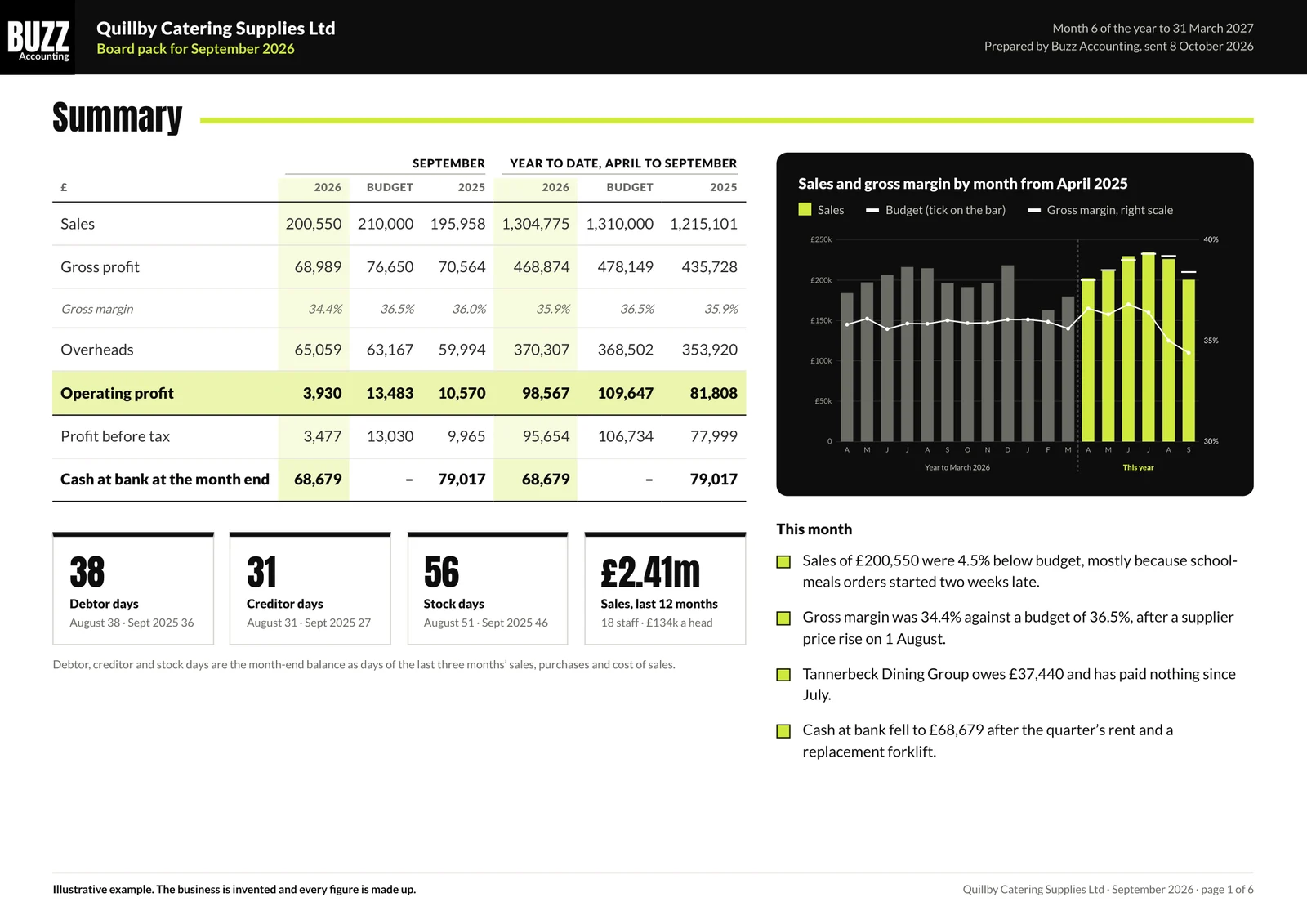
Buzz management accounts cover this work inside Xero as part of Business Pulse: an annual budget, a rolling 12-month cash flow forecast, management accounts set against the budget with written commentary, KPIs and a review meeting ending in agreed actions. Business Pulse costs £375 a month for quarterly reporting or £499 a month for monthly, plus VAT, charged on top of the accounts fee. Buzz is a Xero Gold Partner, and the Xero page covers setting up and tidying a Xero ledger. The sample board pack shows a finished monthly pack.
Action this week
Do these two things in Xero before the month ends.
- Reconcile the bank to today's statement balance for every account, and clear anything left unreconciled from earlier months.
- Set up one tracking category. In the Accounting menu, select Accounting settings, then Tracking categories, then Add Tracking Category. Use departments, sites or types of job, whichever you want to see profit for, and code this week's sales invoices and supplier bills to it.
With both in place, next month's Profit and Loss can be filtered by department or job, and a budget can be set for each option in Budget Manager.
Questions
Can Xero produce management accounts on its own?
Xero produces the reports in a set of management accounts, and their figures are only as complete as the ledger behind them. The Management Report pack, the Budget Variance report and the aged receivables and payables reports all read from the same coded transactions. If the bank is not reconciled, supplier bills are missing or accruals and prepayments have not been posted, every report carries the same error. Xero also leaves the budget, the written commentary and the actions to you. A business that closes its month on a fixed timetable, keeps direct costs in their own accounts and has a budget loaded in Budget Manager can run a useful pack from Xero each month. The management accounts page sets out what Buzz adds.
What is in Xero's Management Report?
Xero's Management Report is a pack of six reports by default: Executive Summary, Cash Summary, Profit and Loss, Balance Sheet, Aged Receivables Summary and Aged Payables Summary, according to Xero's help centre. You can add further reports, including a second version of the same report, and remove or reorder them from the Contents option. Each report keeps its own settings, so comparison periods and columns are set report by report, and only the Pack date range applies to the whole pack. Once the pack is laid out the way you want, click Save as, then Custom, so it can be run again next month with a new date range. You can also start an empty pack with Create new report pack and add only the reports you use.
How do I compare actual figures with the budget in Xero?
Enter a budget in Budget Manager, then run the Budget Variance report, both found under All reports in the Reporting menu. Xero's help centre says the report shows actual income and costs against the budget, with variance columns that can be shown as an amount or as a percentage. Xero calculates the variance as the first column minus the second, and the percentage as that variance divided by the second column. Arrows show whether each variance is favourable or unfavourable. If you use tracking categories, the Filter option shows one department or job, and you can switch to a budget set up for that tracking category. Save the layout as a custom report so the same columns appear each month.
How many tracking categories can I use in Xero?
Xero allows up to four tracking categories in total, with two active at any one time, according to Xero's help centre. Each category holds a list of options, such as a Division category with options for each part of the business, or a Location category with an option for each site. The help centre recommends keeping to 100 options or fewer in each category so reports load quickly. Tracking categories are set up under Accounting settings in the Accounting menu. Once set, each line on an invoice, bill or bank transaction can carry an option, and reports such as the Profit and Loss and Budget Variance can be filtered by it. Budget Manager can also hold a separate budget for a tracking category.
How soon after the month end should management reports be ready?
Management reports can be ready in the second week after the month end if the month is closed within five working days. The close covers reconciling the bank, checking the sales and purchase ledgers, posting accruals, prepayments, payroll and depreciation, reconciling VAT and stock, and a final review before the period is locked in Xero. Reports run before the close is finished will change as late bills and adjustments arrive, which makes the commentary out of date. Running the saved custom report pack on the same working day each month, then adding commentary and publishing it, gives directors figures they can act on in the same month. The month-end close guide sets out a day-by-day timetable.
Sample monthly board pack
Six pages for one month at an invented catering wholesaler with 18 staff, prepared the way the finance team prepares one for a client.
- 1Summary
- 2Profit and loss
- 3Balance sheet
- 4Cash
- 5Customers and suppliers
- 6Commentary
More guides

Management accounts explained
The contents of a monthly management pack, and how to read it.

KPIs to check every month in a small business
The KPIs an owner-managed business checks each month, how to set targets, leading and lagging measures, and a worked monthly KPI sheet.
Sample board pack
A six-page monthly board pack to download.

Gross margin explained
What gross margin is, how it differs from mark-up, how to calculate it, what moves it and why to check it monthly, with a worked example of the confusion.

Working capital explained
What working capital is, how to calculate it from a balance sheet, the working capital cycle in days, why growth uses cash, and a worked example.

Budget against actual variances explained
How to compare each month's results with the budget, tell favourable from adverse variances, split price from volume and decide which ones to act on.

What management accounts cost and include
Management accounts from £375 a month quarterly or £499 monthly + VAT: what a monthly set contains, what the owner provides and when it should arrive.

Management accounts for a construction company
Management accounts for builders and contractors: work in progress, retentions, CIS deductions, the VAT reverse charge and margin by contract.

The 13-week cash flow forecast
How to build a 13-week cash flow forecast, update it every Monday and act on it, with payroll, PAYE, VAT and Corporation Tax in the right weeks.

Month-end close for a small business
How to close the books by working day 10: the reconciliations, accruals and prepayments, the review, and what the management accounts should show.

Debtor control and getting paid faster
Payment terms, invoicing, a chase sequence by day, debtor days, and statutory late payment interest and compensation at the rates on GOV.UK today.

The monthly KPI pack and board pack
The 8 to 12 numbers an owner-managed business should see every month, how to read them, and what a monthly board pack contains, with a worked example.

13-week cash flow forecast template
A free Excel template for the next 13 weeks of receipts, payments and bank balance.

Cash flow forecasting
How to build a 12-month forecast and keep it up to date.
How to read a cash flow forecast
What each line means and where a tight month shows up.

Why a profitable business runs out of cash
Profit is counted when you invoice and cash moves when you are paid. Where the difference goes, how much cash you need, and ways to release it.

How to reduce debtor days
How to work out debtor days, the steps that bring them down, from payment terms to a weekly chasing routine, and the cash a lower figure releases.

Charging interest on late payments
Statutory interest at 8% above base rate, the fixed sums of £40, £70 and £100, when the late payment law applies, how to claim and how to word your terms.

Setting aside money for VAT, PAYE and Corporation Tax
When VAT, PAYE and Corporation Tax are due, how to work out what to move to a tax account each month, and a worked example for a limited company.

CIS deductions and a builder's cash flow
How CIS deductions of 20%, 30% or nothing reduce what a subcontractor banks on each invoice, HMRC deadlines, and gross payment status.

Outsourced credit control and how it works
What an outsourced credit controller does each week, how it runs in your Xero, what it costs against employing one, and the cash it releases.

Cash flow forecasting in Xero
What Xero's short-term cash flow projection shows, what it leaves out, and how to keep a 13-week or 12-month forecast alongside Xero.

How to price for profit
What a price change does to profit, worked through.

Turnover up, profit down
Why sales can rise while profit falls, and where to look.

How to set an annual budget for your business
Six steps to next year's budget, a month-by-month worked example, seasonality, wage rises from April 2026, and reforecasting during the year.
Break-even point explained
How to work out break-even in sales and in units from fixed costs, variable costs and contribution margin, with a worked example and the margin of safety.

What a price rise does to profit
How a small price rise flows straight to profit, how many customers you could lose and still be better off, and how much more you must sell after a discount.
Job costing for small businesses
How to cost each job with materials, labour at a loaded hourly rate, subcontractors and overheads, compare quoted with actual, and value work in progress.

What does a part-time finance director do?
What a part-time or fractional finance director does, the first three months, how it differs from a financial controller, and what one costs.

Finance manager or financial controller?
What a finance manager does, what a financial controller adds, the month-end close, deadlines, how to choose, and what each costs to employ or outsource.
Month-end close checklist
The steps to close the books within five working days: bank, ledgers, accruals, prepayments, payroll, VAT, stock, fixed assets and a final review.

In-house or outsourced bookkeeper?
What employing a bookkeeper costs once National Insurance, pension and holiday cover are added, what an outsourced service covers, and how to switch.

How to run a monthly board meeting
Who attends a board meeting in an owner-managed company, what goes in the board pack, a standard agenda, the decisions and actions log, and the minutes.

Replacing a bookkeeper who has left
Keeping payroll, VAT and the books running when your bookkeeper goes.
The cost of employing a financial controller
What a finance manager, financial controller and finance director cost to employ in 2026 to 2027, with National Insurance and pension, against Buzz fees.
How much a part-time finance director costs
A part-time finance director from Buzz costs £2,000 + VAT a month with the finance team included, against £128,508.40 a year to employ one.
Fractional CFO, part-time FD or interim FD
What a fractional CFO, a part-time finance director, an outsourced CFO and an interim FD each are, and how to choose one for your business.

What a bank wants to see in a business plan
What a lender reads in a business plan: the amount and purpose, ability to repay, forecasts, assumptions, security, guarantees and the people running it.
Talk to us
Tell us about the business and what is taking up your week, or book 30 minutes with Peter. He will come back within 48 hours with the level that fits and a fixed monthly fee.
Book a callOr call
07476 989568Accreditations and partners